
Koren
Tefilla
Turning a Printed Siddur Into a Digital Reading Experience with 10K+ Downloads
I designed the mobile UX/UI for Koren's Tefilla App, translating a highly recognizable printed reading experience into an iOS and Android product built for navigation, personalization, and focused reading.
Mobile Product Design · iOS & Android · Design System
context
Koren's siddur is built around a distinctive visual and reading language. Bringing that experience to mobile meant more than adapting printed pages to a smaller screen.
The app needed to support long, content-heavy prayer flows while introducing mobile navigation, personalization, and digital interactions without losing the familiarity and focus of the printed experience.
I was responsible for the mobile UX/UI and design system, translating Koren's established visual language into a scalable interface for iOS and Android.
The challenge
Preserving Koren's Reading Language Inside a Dynamic Mobile Product
Koren's printed siddur relies on a highly recognizable typographic and reading system. Moving that experience to mobile meant preserving that familiarity while introducing behavior that does not exist in print.
The app needed to support dynamic prayer content based on time, date, and location, alongside personalization and a large amount of structured content, without making the experience feel technical or fragmented.
The challenge was to make that complexity work quietly in the background, while keeping the reading experience focused, familiar, and distinctly Koren.
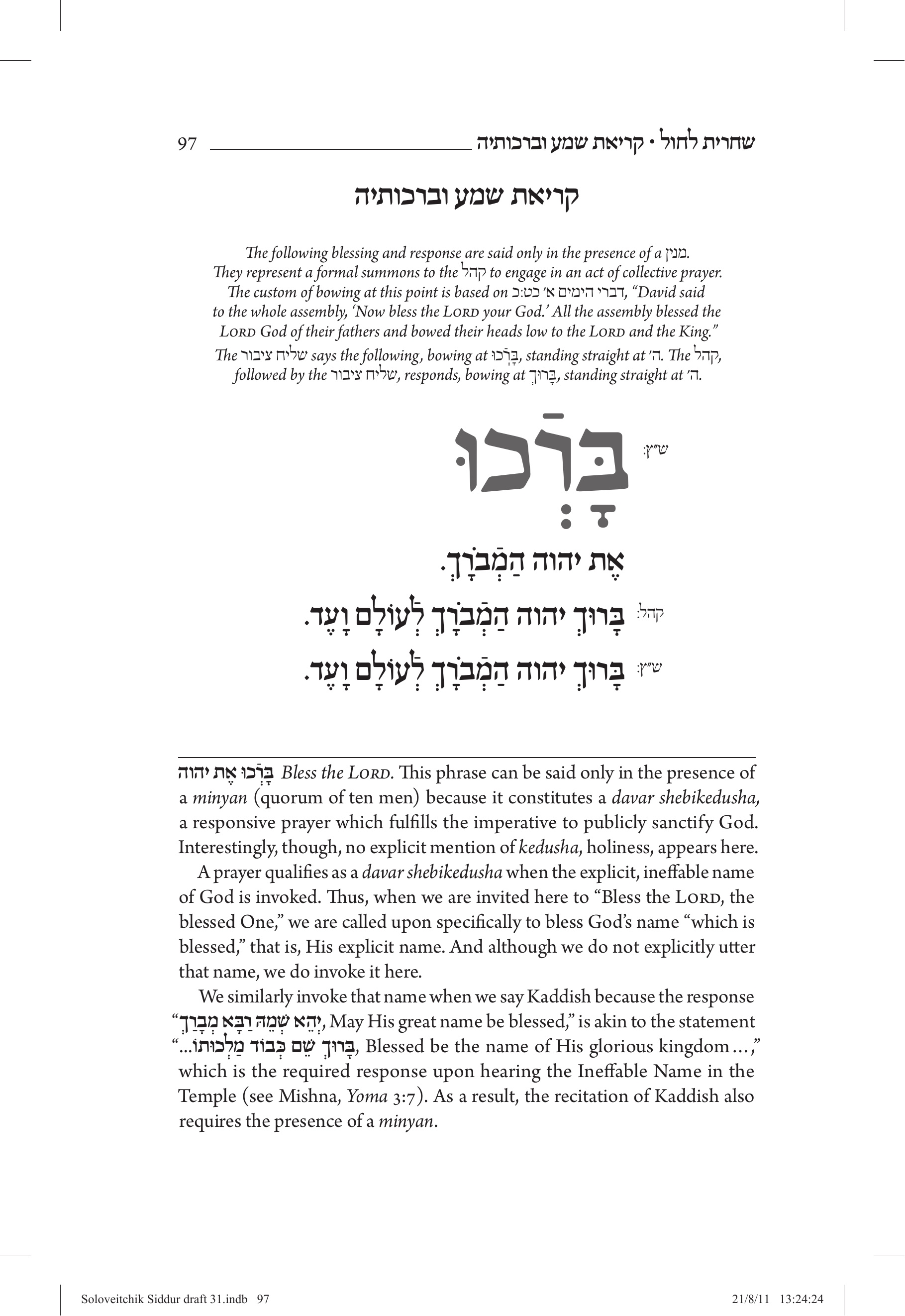
A single prayer page brings together multiple layers of content prayer text, instructions, explanations, annotations, and changing roles each requiring a clear and adaptable digital treatment.
The solution
Designing a Reading System Around the Prayer
I designed the app as a flexible mobile reading system that translates the structure of the printed siddur into a clear digital experience. Each layer of content, including the prayer, instructions, explanations, and contextual variations, was given a distinct role within the interface. Navigation, personalization, and dynamic content adapt around the prayer, while the reading experience remains focused and familiar. A shared design system keeps these patterns consistent across different prayers, content types, and user contexts.
The digital reading experience translates the structure of the printed prayer page into clear and flexible interface patterns, giving every instruction, role, explanation, and prayer element an appropriate place on screen.
PRODUCT DECISION 01 From Static Prayer Pages to a System That Drives the Interface
THE PROBLEM
Prayer content changes according to time, date, location, user preferences, and the structure of each prayer.
Designing every variation as a separate screen would create duplicated work, inconsistent patterns, and a product that would become increasingly difficult to maintain.
DECISION
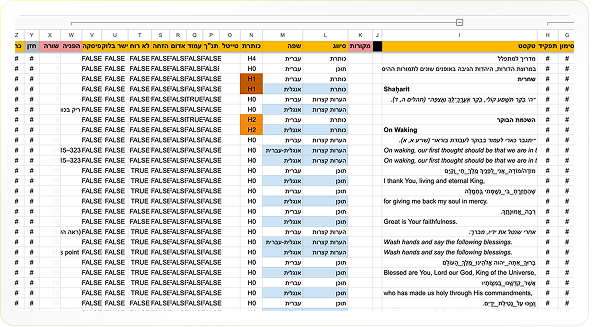
Build a Tagged Content Database That Translates Prayer Logic Into UI
We created a shared content model in which every text element is tagged according to its role, context, and behavior. The tags determine when content appears, how it is presented, and which interface pattern represents it. This allowed a single system to support complex prayer variations without designing each experience manually.
MY ROLE
I worked across content, product, and development to define the tagging logic and translate it into clear interface rules, components, and states.
OUTCOME
The database became a shared foundation for the product, connecting content decisions directly to interface behavior and enabling the experience to remain consistent as new prayers and variations were added.
PRODUCT DECISION 02 Turning Context Into a Relevant Starting Point
THE PROBLEM
The app contains a large library of prayers, variations, and supporting content. The relevant experience changes according to time, date, location, and personal preferences.
Presenting the entire library at once would place the complexity on the user and require them to understand which prayer or variation is relevant before they could begin.
DECISION
Use Context to Prioritize the Right Prayer and Content
We designed the home screen as a contextual entry point rather than a static content library.
The system uses the current day, time, location, and user preferences to prioritize relevant prayers and actions.
Users can begin with the most likely option while still having access to the full prayer library when needed. This allowed the complexity to remain within the product logic instead of becoming part of the navigation experience.
MY ROLE
I defined the information hierarchy, prioritization logic, and interface states that connect contextual data to the content presented on the home screen.
I worked with product, content, and development to ensure that changing conditions would produce clear and predictable results for the user.
OUTCOME
The home screen gives users a simple and relevant starting point while supporting the complexity of a dynamic prayer system behind the interface.
OUTCOME
From Product Launch to Ongoing Use
The Koren Tefilla App launched as a full production product for iOS and Android and continues to serve an active user base. Today, the app has reached 10K+ downloads on Google Play, holds a 4.2★ rating from 194 reviews, and reached #5 in the Books category on the App Store.
For me, the strongest signal is not only that the app launched, but that the product remained in use and continued to support a real audience over time.
REFLECTION
What I took from this project
This project reinforced how different it is to design for mobile when the content itself carries a strong existing identity.
The challenge was not to replace the printed experience with a more "digital" one, but to understand which parts of that experience needed to remain familiar, and where mobile interaction could genuinely improve usability.
It also strengthened my experience designing content-heavy mobile products, where typography, navigation, dynamic states, and personalization all need to work together without competing for attention.